MatePoints v1.1.0 — What's New
New week, new features! This is what is out now!

Hey MatePoints households! 👋
We've been busy building and we're excited to share everything that's landing in v1.1.0. This is our biggest update yet — two brand-new tabs, bulk management tools, bug fixes, and a handful of quality-of-life improvements that you've been asking for.
Here's everything you need to know.
What's New at a Glance
- 📅 Planner Tab — All members
- 📋 History Tab — All members
- ☑️ Bulk delete tasks — Owners & Editors
- ☑️ Bulk delete achievements — Owners & Editors
- ⭐ Preferred household — All members
- ❓ FAQ page — All users
- 📱 Mobile UX improvements — All mobile users
- 🐛 Bug fixes — Everyone
📅 The Planner Tab
Plan your household's tasks before they happen.
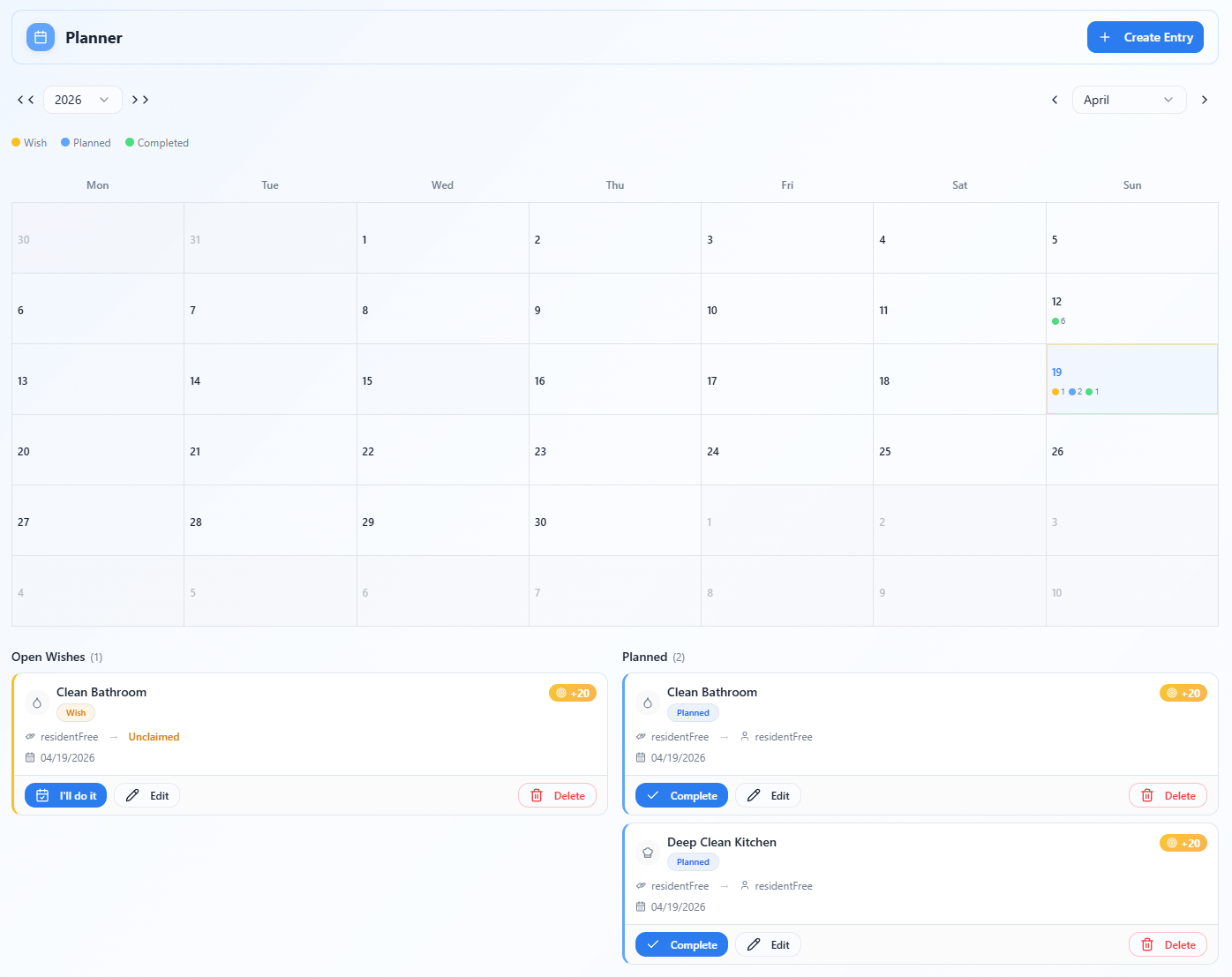
The Planner is a brand-new tab inside your household. It gives you a full monthly calendar view where you can schedule tasks in advance — so nothing falls through the cracks.
Two types of entries
Wishes are tasks someone would like done — they're unassigned and open for any member to pick up. Think of them as putting your hand up and saying "this needs doing."
Planned entries are tasks that have been assigned to a specific person on a specific date. When you create a planned entry, it's yours to complete.
Filters
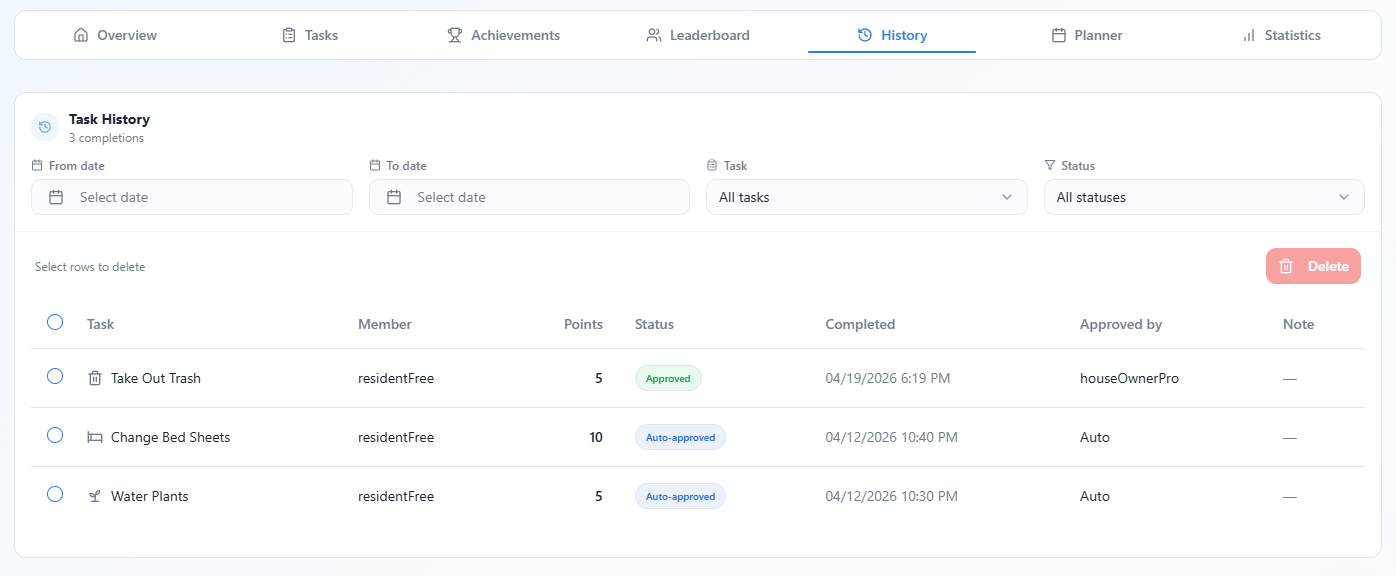
You can filter completions by:
- Date range — from / to
- Member — who completed the task
- Task — which task was done
- Status — approved or auto-approved
Use the Reset button in the top-right of the section header to clear all active filters at once.
Bulk delete completions
Owners and Editors can clean up the history log. Check the boxes next to any completions, then hit Delete to remove them. A confirmation dialog lists exactly what you're about to delete so there are no surprises.
Note: Deleting a completion record also removes the points that were awarded for it.
☑️ Bulk Delete — Tasks & Achievements
Managing a long list of tasks or achievements just got a lot faster.
Bulk deleting tasks
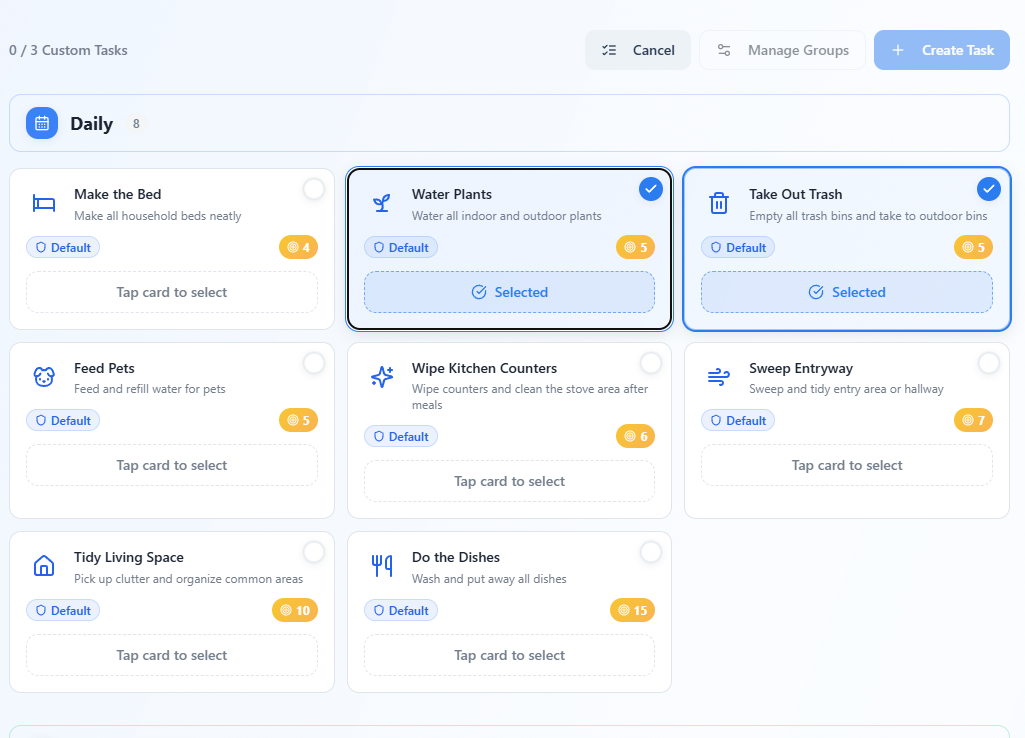
Enter selection mode by tapping the multi-select button on the Tasks section header. Each task card gets a checkbox. Select the ones you want to remove, then hit Delete from the floating dock at the bottom of the screen. You can also use Select All to grab every task on the page in one tap.
Bulk deleting achievements
The same flow applies to achievements. Toggle selection mode, pick the achievements you want to remove, and confirm the deletion. The floating dock shows a live count of how many are selected so you always know where you stand.
Both tools are available to Owners and Editors only.
⭐ Preferred Household
If you're a member of more than one household, you can now set a preferred household. When you log in, MatePoints takes you straight there — no picking from a list every time.
A "My Household" shortcut button also appears in the navbar so you can jump back to your preferred household from anywhere in the app with a single tap.
To set your preferred household: open the dashboard, amd click the star on the household.
❓ FAQ Page
We've added a Frequently Asked Questions page to the app. Find answers to common questions about points, levels, subscriptions, achievements, and more — without having to dig through settings or contact support.
You can find the FAQ from the main navigation menu.
🐛 Bug Fixes
A number of bugs squashed in this release:
Task icons on pending tasks — All pending tasks were showing the same icon regardless of the task type. This has been fixed; each task now displays its correct icon in the pending tray.
Subscription plan language — Subscription plan descriptions were showing hardcoded English text instead of following your app language setting. Plans are now fully translated.
Create / Join household loading state — In some cases the page navigated before the loading state cleared, making it possible to accidentally double-submit a household creation. The loading state now persists through navigation so this can't happen.
Task edit validation — Points and title fields in the task editor now validate correctly before allowing a save. Previously it was possible to save a task with an empty title or invalid point value.
Household name validation — Creating a household now enforces stricter name rules both in the UI and at the database level, preventing edge cases with very short or invalid names.
📱 Mobile UX Improvements
We've made a focused pass on how the app feels on a phone.
Bottom sheets everywhere — Dialogs and panels that previously appeared as centered popups on mobile now slide up from the bottom of the screen. This matches how most mobile apps work and makes them much easier to reach with one hand.
This applies to:
- The Day Tray when you tap a calendar date in the Planner
- The Create entry sheet in the Planner
- The Edit entry sheet in the Planner
- Any other action sheets and confirmation dialogs
General phone fixes — A number of small layout and spacing issues on narrow screens have been cleaned up so buttons, cards, and forms all feel correctly proportioned on both small and large phones.
🔧 Under the Hood
A few improvements you won't directly see but will feel:
- Timezone-aware planner — The planner respects your household's configured timezone when showing today's date and bucketing completed tasks. Households with non-UTC timezones will now see the correct day highlighted and the correct completions shown per day.
- Faster navigation — A new shared profile context means your display name and avatar are fetched once and reused across the app rather than re-fetched on every page transition.
- Language key improvements — The language detector now correctly resolves browser locales like
en-US,en-GB, andnb-NOto the right language without needing an exact match.
Stay tuned — and as always, thank you for using MatePoints. If you run into anything or have a feature idea, let us know through the feedback button in the app.
— The MatePoints Team